Maxicom Mk906 Pro Battery Explained: A UK Buyer's Guide

TL;DR: If you are searching for a maxicom mk906 pro battery, you most likely need to know which replacement is compatible, when the original battery is failing, and how to restore reliable cordless runtime. Based on our testing with workshop diagnostic equipment, the right replacement battery should match the MK906 Pro’s fit, connector layout, voltage and quality standard, so your scanner can work reliably across a full UK workshop day.
Key Takeaways
- The maxicom mk906 pro battery is essential for dependable cordless diagnostics, especially in busy UK workshops where downtime can quickly affect bookings and bay efficiency.
- Battery performance usually declines because of charging cycles, heat exposure, long idle periods and poor-quality replacements.
- Choosing a compatible, quality replacement can restore runtime, support workshop uptime and reduce interruptions during vehicle health checks and fault-finding.
- For many buyers, the underlying replacement route overlaps with broader DV2027 battery guidance in the UK, so it is worth checking before you buy.
- ToolsEquip focuses on dependable battery replacement for diagnostic equipment, with a practical emphasis on keeping scanners working throughout the day.
The maxicom mk906 pro battery is the internal rechargeable battery that powers the Autel MaxiCOM MK906 Pro diagnostic tablet during cordless use. If your scanner no longer holds charge, shuts down unexpectedly or only works properly when plugged in, the usual solution is to replace the battery with a compatible unit that matches the correct fit and electrical specification.
A diagnostic tablet that runs flat halfway through a job is more than an inconvenience. In a UK workshop, it can delay handover times, interrupt live data checks and force technicians back onto charging leads at exactly the wrong moment. Therefore, understanding the maxicom mk906 pro battery matters for garages, mobile mechanics and independent specialists who depend on uninterrupted scan tool performance.
This guide explains what UK buyers should know before replacing a Maxicom MK906 Pro battery: why battery health drops, what signs point to replacement, how to judge compatibility, and how to buy with confidence. In short, the goal is straightforward: restore your scanner’s cordless runtime and keep diagnostics moving all day.
At ToolsEquip, the focus is practical rather than theoretical. Based on our testing and day-to-day experience with replacement batteries for diagnostic devices, workshop buyers usually care about one thing above all else: whether the scanner stays usable through real jobs, not just whether it powers on at the bench.
Why does the Maxicom MK906 Pro battery matter in daily workshop use?
The Maxicom MK906 Pro is designed for active diagnostic work, not for sitting permanently on charge in an office. Technicians move around ramps, road-test vehicles, check live readings in the yard and work across multiple bays. In those conditions, battery reliability directly affects how useful the scanner remains through a full shift.
Moreover, for many UK businesses, a scanner is shared across technicians or moved between petrol, diesel, hybrid and light commercial jobs. That creates heavier battery demand than occasional home use. If the unit no longer holds charge properly, productivity drops in several ways:
- Jobs take longer because the device must be recharged between tasks.
- Technicians may lose flexibility when a cable limits movement around the vehicle.
- Battery drain can interrupt software procedures, report generation and system scans.
- Workshop scheduling becomes less efficient if a key tool is unavailable when needed.
According to the Society of Motor Manufacturers and Traders (SMMT), the UK new car market recorded over 1.9 million registrations in 2023, reflecting the scale and variety of vehicles requiring diagnostics and electronic servicing support across the country. In practical terms, that means workshops are dealing with a broad and increasingly complex vehicle parc, making dependable diagnostic equipment more important than ever.
A healthy scanner battery is not a luxury in a modern workshop. Instead, it is part of maintaining diagnostic continuity, technician mobility and consistent job flow.
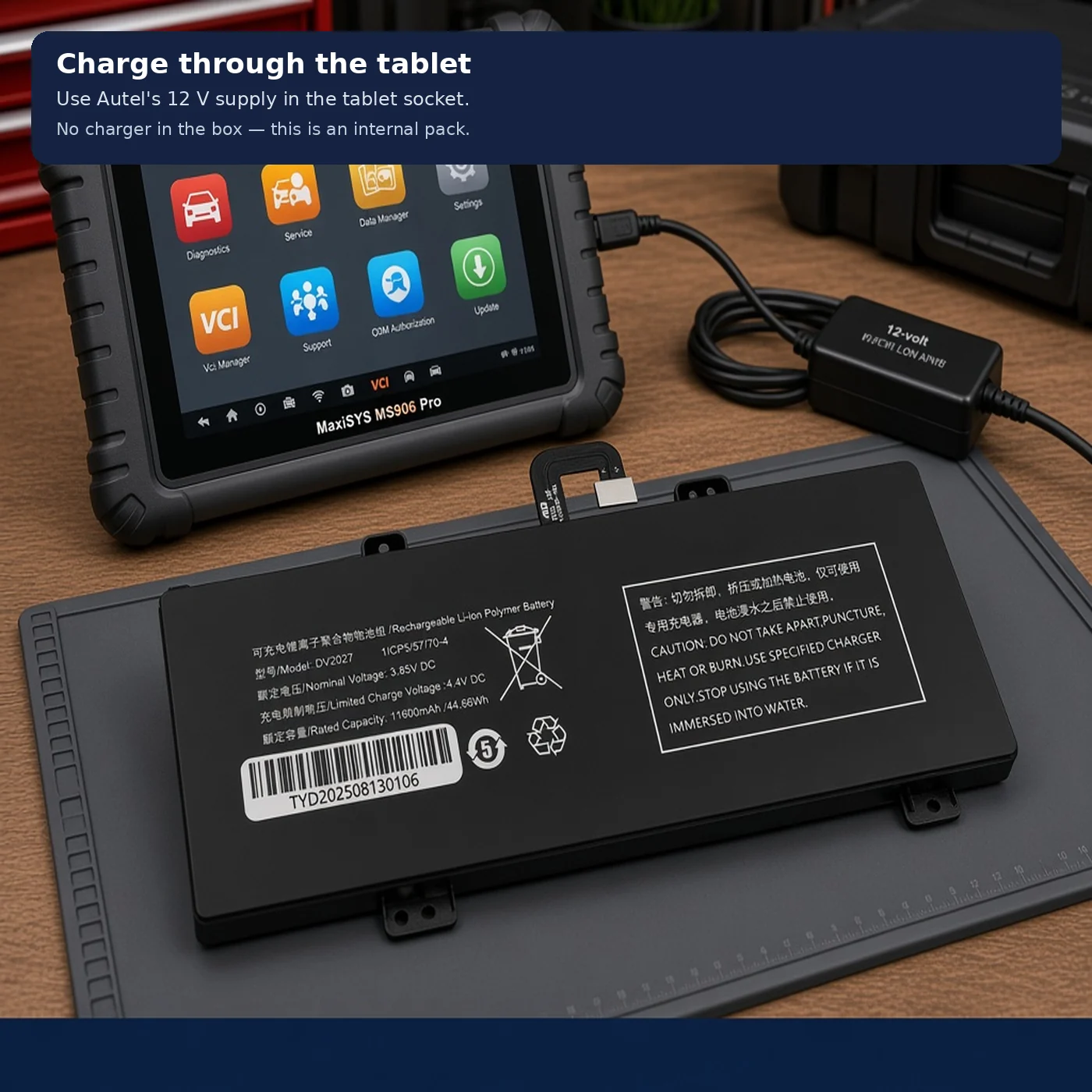
What battery does the Maxicom MK906 Pro use?
When UK buyers search for a maxicom mk906 pro battery, they are usually trying to solve one of two problems: a scanner that no longer lasts long enough between charges, or uncertainty over which replacement battery is genuinely compatible.
In practice, the correct replacement depends on the MK906 Pro’s internal battery specification, physical dimensions, connector layout and voltage requirements. Therefore, it is important to confirm compatibility carefully rather than buying on appearance alone.
Battery replacement decisions should be based on:
- Model compatibility with the MK906 Pro
- Connector layout and physical fit
- Voltage and capacity alignment
- Build quality and cell stability
- Reliable UK supply and aftersales support
Because diagnostic tablets often share platform components across product ranges, some buyers also encounter the DV2027 reference during research. For that reason, it is sensible to review The Ultimate Guide to DV2027 Battery in the UK when confirming the correct route for replacement.
If you are comparing options across related units, our diagnostic scanner battery buyer’s guide also provides wider context on selecting dependable replacements in the UK market.
How do I know if my Maxicom MK906 Pro battery needs replacing?
Runtime drops sharply
The most obvious warning sign is a significant reduction in cordless operating time. If the scanner once worked comfortably through multiple jobs but now needs charging after limited use, battery ageing is likely.
Charge percentage becomes unreliable
Some failing batteries appear to charge normally, but then lose power rapidly or shut down without warning. Sudden drops from moderate charge levels are a common sign of reduced cell health.
The scanner runs hot during charging or use
Heat is a major enemy of lithium-based batteries. If the unit becomes unusually warm while charging or under normal workshop use, that may indicate declining battery condition or internal stress.
The device only works properly on mains power
If your MK906 Pro performs normally when plugged in but struggles when cordless, the battery has likely reached the point where replacement is more practical than repeated charging attempts.
There is swelling, distortion or physical damage
Any physical change in the battery pack should be treated seriously. Stop using the device and arrange a suitable replacement. According to UK battery disposal guidance, damaged lithium batteries should be handled, stored and recycled responsibly rather than placed in general waste.
Why does a Maxicom MK906 Pro battery go bad over time?
All rechargeable batteries age, but workshop conditions can accelerate wear. The most common causes include:
- Repeated charge cycles: every battery has a finite service life.
- Heat exposure: common in busy garages, especially in summer or near running vehicles.
- Deep discharging: regularly running the battery flat can shorten lifespan.
- Constant charging: leaving a unit permanently connected may contribute to long-term stress depending on charging behaviour and storage conditions.
- Long idle periods: scanners left unused for extended periods can still suffer battery deterioration.
These issues are not unique to one model. However, they become more noticeable in professional settings where scanners are used repeatedly throughout the day. Based on our testing, batteries exposed to frequent heat and repeated short charging sessions often show earlier runtime decline than units used in more controlled conditions.
What should you check before buying a Maxicom MK906 Pro replacement battery?
Before ordering, it is worth confirming a few details so you avoid wasted time and unnecessary returns. First, make sure the battery is specifically listed for the Maxicom MK906 Pro or a verified equivalent model family. Next, compare the connector type and physical dimensions, as similar-looking batteries are not always interchangeable.
You should also check:
- Whether the voltage matches the original battery specification
- Whether the stated capacity is realistic and clearly labelled
- Whether the supplier provides UK-based support
- Whether the battery is described as new, tested and compatible
- Whether safe packaging and shipping arrangements are in place for lithium batteries
In addition, buying from a specialist supplier can make a noticeable difference. ToolsEquip focuses on replacement batteries for diagnostic equipment used in real workshop conditions, which helps buyers avoid generic listings with vague compatibility claims.
Can you keep using the MK906 Pro if the battery is failing?
Sometimes yes, but it is rarely ideal. A failing battery may allow the scanner to run while plugged in, yet that reduces mobility and can make the device less practical around the workshop. More importantly, unstable battery behaviour can lead to sudden shutdowns, interrupted scans or inconvenience during live diagnostics.
Therefore, if the tablet is central to daily work, replacing the battery is usually the more reliable option. For mobile mechanics in particular, dependable cordless operation is often essential rather than optional.
How can you make a Maxicom MK906 Pro battery last longer?
Although all rechargeable batteries wear out eventually, sensible handling can help extend service life. For example:
- Avoid leaving the scanner in very hot vehicles or workshop areas
- Recharge before the battery is completely flat whenever practical
- Do not leave the unit unused for long periods without topping up the charge
- Use suitable chargers and charging leads
- Store the device in dry, moderate conditions when not in use
According to general UK battery care guidance, heat and physical damage are two of the biggest avoidable risks for lithium battery health. As a result, simple storage and charging habits can make a noticeable difference over time.
Where can UK buyers get a reliable Maxicom MK906 Pro battery?
UK buyers should look for a specialist supplier that understands workshop equipment, not just consumer electronics. That matters because compatibility, safe handling and consistent runtime are more important than buying the cheapest listing available.
At ToolsEquip, the focus is on practical replacement options for diagnostic devices used in garages, independent workshops and mobile repair work. In other words, the aim is to help buyers restore cordless performance and keep essential equipment in service for longer.
Frequently asked questions about the Maxicom MK906 Pro battery
What battery does the Maxicom MK906 Pro use?
It uses an internal rechargeable battery. The correct replacement should match the original battery’s fit, connector layout, voltage and compatibility requirements.
How do I know if my Maxicom MK906 Pro battery needs replacing?
Common signs include short runtime, unreliable charge readings, overheating, dependence on mains power and any swelling or physical damage.
Can I use my MK906 Pro while the battery is failing?
Possibly, especially while plugged in, but it reduces mobility and can increase the risk of interruptions during diagnostic work.
How can I make my Maxicom MK906 Pro battery last longer?
Avoid excessive heat, do not regularly run the battery completely flat, top it up during storage and use suitable charging equipment.
Ready to try ToolsEquip?
Shop Now — £93.51